How to build a personal site on Cloudflare Workers
An empty directory to a static site on your own domain that publishes when you push — and the five points in that build where the answer that looks right is wrong and nothing raises an error.
Published · Updated
- #cloudflare
- #astro
The build went red and the site went live. Same push, same minute, two tabs open side by side: a failing check on GitHub, a fresh deploy on Cloudflare.

Nothing was broken. That is how this setup works when you wire it the obvious way, and it took me longer than I want to admit to see why.
Here is the path from an empty directory to a static site on your own domain that publishes when you push. It fits inside Cloudflare’s free tier. You need Node 22.12 or newer, a package manager, and — if you want the domain at the end — a domain.
Steps 1 through 5 are the whole minimum path. After step 5 you have a live site on your domain that redeploys on every push, and you can stop there with a working thing. Step 6 is what you put on it. The section after that is optional, is not about Cloudflare, and is design notes rather than steps.
I am giving it in that order because the order is most of what I learned. Five times in this build, the answer that looks right is wrong, and not one of them raises an error. Your build stays green. Your browser looks fine. That is the real subject here; Cloudflare is just where I happened to run into it.
Versions, because this kind of post rots: Astro 7.2, Wrangler 4.120, Node 22.23, pnpm 11.21, as of August 2026. If create astro hands you something newer, the shape below should still hold — the prompt wording may not.
The finished thing is latentyonder.com — this site.
Why Workers, and what it actually does
Cloudflare has two static hosts. Pages still runs and is not going away this year, but new projects are pointed at Workers with Static Assets, and that is the one I would learn.
Start with what happens when someone opens your site:
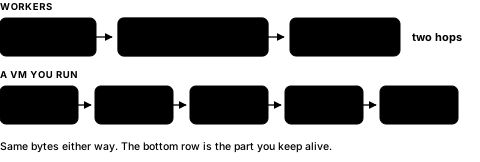
Your built files are copied out to Cloudflare’s edge ahead of time. A request lands at whichever location is nearest to the reader and is answered from there. There is no origin server behind it, and — this is the part that surprises people — none of your code runs. You are not paying for compute because there is no compute.
So why Workers rather than Pages, when both do this? Pages is a static host. Workers is the whole platform with static files as one mode of it. The day you want a Cron trigger, a KV namespace, an R2 bucket, or one real API endpoint, you add it to this project instead of moving off it. The config also lives in a file in your repo rather than a dashboard, so it diffs and reviews like code.
I would not migrate a working Pages site for this. For a new one, start here.
1. Scaffold the site
Astro fits this job: zero JavaScript shipped by default, Markdown as a first-class content source, plain files as output.
node --version   # must be >= 22.12
pnpm create astro@latest personal-site
Odd-numbered majors such as 23 are not supported, so that is 22.12 or newer, or 24 — not 23.
The wizard asks four questions, and the answers decide whether your tree looks like mine. What I picked:
| Prompt | Answer |
|---|---|
| How would you like to start? | Empty |
| Install dependencies? | Yes |
| Initialize a git repository? | Yes |
| How strict should TypeScript be? | Strict |
Empty rather than the blog template on purpose. The template hands you a content collection, a layout, and three sample posts, all of which you rewrite in week one — and step 6 below is a lot clearer when you write that collection yourself. Strict rather than strictest: strictest turns on noImplicitReturns and friends, which is a fight I did not want in a site with about four TypeScript files.
cd personal-site
pnpm dev
Pin the version you just used, so your machine and CI cannot drift apart later:
node --version > .nvmrcNow resist the urge to design the homepage. I did not, and I paid for it: the next step is where things go wrong, and it is far cheaper to go wrong now, with three files in the repo, than in a week with a site you care about.
2. Deploy before you write anything — trap 1 of 5
A broken deploy against a scaffold is a five-minute fix. The same failure next week arrives tangled up with everything you wrote in between, and you will not know which half is at fault.
pnpm add -D wrangler
pnpm exec wrangler login
Create wrangler.jsonc next to package.json:
{
  "$schema": "node_modules/wrangler/config-schema.json",
  "name": "personal-site",
  "compatibility_date": "2026-08-11",
  "assets": {
    "directory": "./dist",
    "not_found_handling": "404-page"
  }
}
That is the whole config: where the built files are, and what to do about paths that do not exist.
Do not paste a
main. Almost every Wrangler snippet online assumes you have a Worker script and opens with"main": "src/index.ts". Copy that line and you have told Cloudflare to execute code you do not have. A static site has no script. Leave it out.
not_found_handling: "404-page" is what makes an unknown path return your 404.html with an actual 404 status. Skip it and you get an empty response that looks fine in a browser and is wrong to everything else — crawlers, uptime checks, curl. It needs a page to serve, so write the smallest one that works before you lean on it:
---
// src/pages/404.astro
---
<html lang="en">
  <head>
    <title>404 · Not found</title>
  </head>
  <body>
    <h1>404</h1>
    <p><a href="/">Back to the homepage</a></p>
  </body>
</html>
Astro builds that to dist/404.html, which is the exact filename Wrangler looks for. Make it pretty later.
Ship it:
pnpm build
pnpm exec wrangler deploy
Wrangler prints a *.workers.dev URL, and your scaffold is on the internet. Wire those two steps together while you are here:
"scripts": {
  "deploy": "astro build && wrangler deploy"
}
3. Point a domain at it — trap 2 of 5
Skip this if *.workers.dev is fine — everything below still works, and coming back later changes no code.
This is the only step that involves a company other than Cloudflare, and the only one where you can break something that was previously working. The domain’s nameservers have to move to Cloudflare, and moving nameservers moves all of the domain’s DNS, not just the website.
Add the site in the Cloudflare dashboard first. It scans your registrar’s existing zone and copies what it finds. Read that scan before you touch the nameservers. It is usually right about A and CNAME; the record that hurts when it is missed is MX. If mail is delivered to this domain, mail stops arriving the moment the new nameservers take over, and nothing bounces back to tell you. Check MX, plus any TXT records carrying SPF or DKIM, against the old zone by hand, and add what the scan missed.
Then change the nameservers at your registrar to the two Cloudflare gives you. Cloudflare emails you when the zone goes active — twenty minutes for me, documented as up to 24 hours, and registrars that cache aggressively can stretch it further. Until it flips, the old nameservers are still answering, so this is a handover rather than a gap: nothing is down in the middle, it just is not yours yet.
Once the zone is active, declare the routes in the same config file rather than clicking through the dashboard:
{
  "workers_dev": false,
  "routes": [
    { "pattern": "latentyonder.com", "custom_domain": true },
    { "pattern": "www.latentyonder.com", "custom_domain": true }
  ]
}
custom_domain: true creates the DNS record for you. Bind the apex and www both: one of them is canonical, the other exists so a visitor who types the wrong one still arrives.
Declaring
routesswitches off yourworkers.devsubdomain. The URL you have been testing with stops resolving. When it happened to me the obvious reading was that I had just broken the deploy. I had not. I setworkers_dev: falseexplicitly so the file states the intent, rather than leaving a future me to rediscover it.
4. Tell the site its own address — trap 3 of 5
The site is live and quietly lying about where it lives. Astro stamps canonical tags and RSS links from one config value that still says https://example.com. Nothing warns you. Every page renders identically.
The sitemap is not in the scaffold at all — it is an integration:
pnpm astro add sitemapThat installs @astrojs/sitemap and edits astro.config.mjs for you. It emits sitemap-index.xml at build time and silently emits nothing if site is unset, which is the next thing to fix.
It is two places, not one.
// astro.config.mjs
export default defineConfig({
  site: 'https://latentyonder.com',
});
# public/robots.txt
Sitemap: https://latentyonder.com/sitemap-index.xmlDeploy again, then check from outside instead of trusting the browser:
curl -sI https://latentyonder.com | head -1              # expect 200
curl -sI https://latentyonder.com/nope | head -1         # expect 404
curl -s  https://latentyonder.com/ | grep -i canonical   # expect your domain
The 404 line is the one I skipped. A misconfigured static host returns 200 with an empty body for every missing path, and nothing tells you until a crawler indexes a thousand blank pages.
5. Make push the deploy — trap 4 of 5
Two pieces: CI that tells you the build is sound, and Workers Builds that ships it.
CI needs two tools an empty scaffold does not have — a test runner, and Astro’s type checker:
pnpm add -D vitest @astrojs/check typescriptThen .github/workflows/ci.yml, in full, because a fragment of this file is worse than no file:
name: CI

on:
  push:
    branches: [main]
  pull_request:

jobs:
  verify:
    runs-on: ubuntu-latest
    steps:
      - uses: actions/checkout@v4
      - uses: pnpm/action-setup@v4
      - uses: actions/setup-node@v4
        with:
          node-version-file: .nvmrc
          cache: pnpm
      - run: pnpm install --frozen-lockfile
      - run: pnpm vitest run
      - run: pnpm astro check
      - run: pnpm build
Two details that cost me a red run each. pnpm/action-setup has to come before setup-node, because cache: pnpm needs a pnpm on the box to ask about. And vitest run exits non-zero when it finds no test files at all, so on day one either drop that line or write pnpm vitest run --passWithNoTests until you have a test — I would rather drop the line, because the flag has a way of surviving long past the day you needed it.
node-version-file: .nvmrc is why you wrote that file in step 1 — local and CI stay on one version, so “works on my machine” means something.
Then in the Cloudflare dashboard: open the Worker, Settings → Build → Connect to Git, pick the repo, fill in two fields.
| Field | Value |
|---|---|
| Build command | pnpm build |
| Deploy command | pnpm exec wrangler deploy |
pnpm exec and not pnpm wrangler. The short form does work — pnpm falls back to the local binary when no script matches — but it is a fallback, it does not survive being translated to another package manager, and this box is not somewhere you want to be clever.
Save, and a push to main is a publish. This is where the two tabs come from.
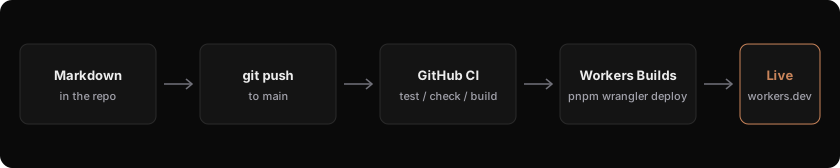
Your CI is not a gate. GitHub Actions and Workers Builds both subscribe to the same push and run independently. Workers Builds has no setting that waits on an external status check. The red X and the live deploy happen at the same time because neither one is watching the other.
Be precise about what that does and does not mean. Workers Builds runs pnpm build itself, so code that fails to compile never ships — the build step dies and the deploy never runs. What slips through is everything CI checks that the build does not: a failing vitest run, a type error that astro check catches but the build tolerates. Those go live with the tests still red.
For a personal blog I find that fine, and I have left it this way. The worst case is a typo in public. If you want the gate, do not use Workers Builds’ automatic deploy at all — turn it off and make deployment the last step of CI, where it is naturally guarded by the steps above it:
      - run: pnpm exec wrangler deploy
        env:
          CLOUDFLARE_API_TOKEN: ${{ secrets.CLOUDFLARE_API_TOKEN }}
Either choice is defensible. Not knowing which one you have is not.
One more thing: do the first deploy by hand, as in step 2, even though automation is now set up. Wiring automation onto a pipeline you have never seen succeed means debugging two unknowns at once.
That is the minimum path. Site on your domain, publishing on push, and you can stop reading here. What follows is about what goes on it.
6. Content is Markdown
Astro’s content collections validate front-matter at build time, so a malformed date fails the build instead of rendering a broken page:
// src/content.config.ts
const blog = defineCollection({
  loader: glob({ base: './src/content/blog', pattern: '**/*.md' }),
  schema: z.object({
    title: z.string(),
    description: z.string(),
    pubDate: z.coerce.date(),
    updatedDate: z.coerce.date().optional(),
    tags: z.array(z.string()).default([]),
    draft: z.boolean().default(false),
  }),
});
A post is now a file. draft: true keeps it out of the production build while astro dev still shows it — the entire feature set I wanted from a CMS, in one boolean.
Note what this step does that the previous five did not: it fails loudly. Everything before it failed silently, which is why every one of them cost me an afternoon and this one has never cost me anything.
Optional: a second language — trap 5 of 5
Nothing here is a step, and nothing here is about Cloudflare. These are the design notes for one part of my site, kept next to the build because the failure mode is the same one and this is the only part with a real decision in it. Skip it if you write in one language.
The code is three small modules — utils.ts for URLs and id parsing, posts.ts for list building and pairing, freshness.ts for staleness warnings — and they are the only files on the site with unit tests beside them, for a reason I get to at the end.
One rule generates everything else: English is the only original, and a /zh/ URL never serves English. Same filename means a pair — en/this-post.md is the source of truth, zh/this-post.md either matches it or does not exist.
Three situations have to be answered, and each one has an answer that is stricter, easier to implement, and wrong.
A post with no translation yet. Hiding it is the tidy answer, and it makes the Chinese list lie about what I have written. So the card stays, keeps its English title, gets an EN badge, and links out to /blog/.... What I refuse to generate is /zh/blog/this-post/ containing an English body. A URL that promises one language and delivers another is worse than an honest badge.
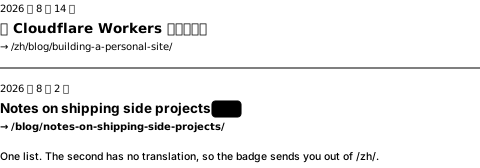
/zh/.The language switcher on an untranslated post. Pointing it at the URL that would exist produces a 404. Instead: if the other language has this post, go there; if not, go to that language’s blog index. A missing translation should land you on a smaller page, never a dead one.
A translation that has fallen behind. Every Chinese file records sourceUpdated — the English date as of the day it was translated. Change the English on Tuesday, forget the Chinese, and Friday’s build still succeeds, printing a warning that the translation may be stale. Failing the build here is the disciplined-looking answer, and what it actually teaches you is to stop translating.
The strict answer is the hostile one. Hide it, 404, fail the build. Each is easier to write than what I shipped, and each one punishes the reader for a gap in my work. Three branches, all of them silent when they go wrong, none of them visible in a rendered page — which is why this is the one place on the site I bothered to unit test.
Day to day
- Write
src/content/blog/en/my-post.md git push
That is the whole loop. If you took the optional section, it gains one line: a same-named file under zh/, with sourceUpdated set to the English post’s date.
I still keep both tabs open. The red X next to the green deploy stopped being alarming once I understood it, and I have not changed the wiring, because for this site I would rather ship a typo than add a gate I have to maintain.
That is the thing worth taking from a weekend of setup, and it is not about Cloudflare. Four of the five traps here cost me real time for the same reason: a system that is wrong and quiet outranks a system that is wrong and loud, every time. Step 6 is the only one that ever shouted at me, and it is the only one I have never had to think about since.
Prefer the tools that fail loudly. Then go check the quiet ones with curl.